The maps under the mosaics
The switch at the top right of a mosaic's map chooses what is under it. Every map starts with the one chosen under User Preferences › Map (ESRI Satellite unless another is chosen), and switching changes that map only.
- ESRI Satellite (the default) and OpenStreetMap need nothing set up. Where Esri's imagery stops short of the zoom shown, its deepest level there is stretched instead of showing "Map data not yet available". OpenStreetMap's credit stays open at the bottom right of the map while it is shown.
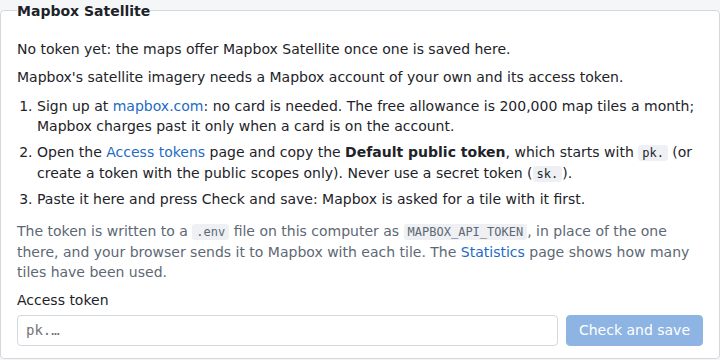
- Mapbox Satellite needs a Mapbox account of your own and its access token, saved under System Settings. The switch lists it once a token is known.
- None shows the mosaic alone, and loads nothing from the internet.
Mapbox Satellite
Getting the token
- Sign up at mapbox.com: no card is needed. The imagery comes through Mapbox's Static Tiles API, whose free allowance is 200,000 tiles a month; Mapbox charges past it only when a card is on the account.
- On the Access tokens page, copy the Default public token
(it starts with
pk.), or create a token with the public scopes only. A secret token (sk.) is refused: the browser sends the token to Mapbox with each tile, so anyone using the page could read it. Mapbox's URL restrictions do not accept127.0.0.1, so leave the token unrestricted. - Paste it under System Settings › Mapbox Satellite and press Check and save. Mapbox's Statistics page shows how many tiles have been used.
The app first asks Mapbox for one tile with the token, and saves it only if Mapbox serves it. Otherwise it says why (a wrong token, the account's limit, or Mapbox out of reach), and nothing is changed.
Where it is kept
The token is kept as MAPBOX_API_TOKEN in a .env file: the one in the folder the app is started from or in the
data folder, whichever it was read from (else the data folder's, made readable by you only). A new token replaces the
old one in that file, the file's other lines kept; no earlier token is kept, and a token can be replaced but not
removed there.
You can also write MAPBOX_API_TOKEN=pk.... in one of those files yourself. A MAPBOX_API_TOKEN in the environment
the app is started from wins over the files: System Settings then shows it, and it is changed there. A token saved by
an earlier version of the app (in its preferences) is moved to the data folder's .env when the app starts, unless a
token is already known.