Findings
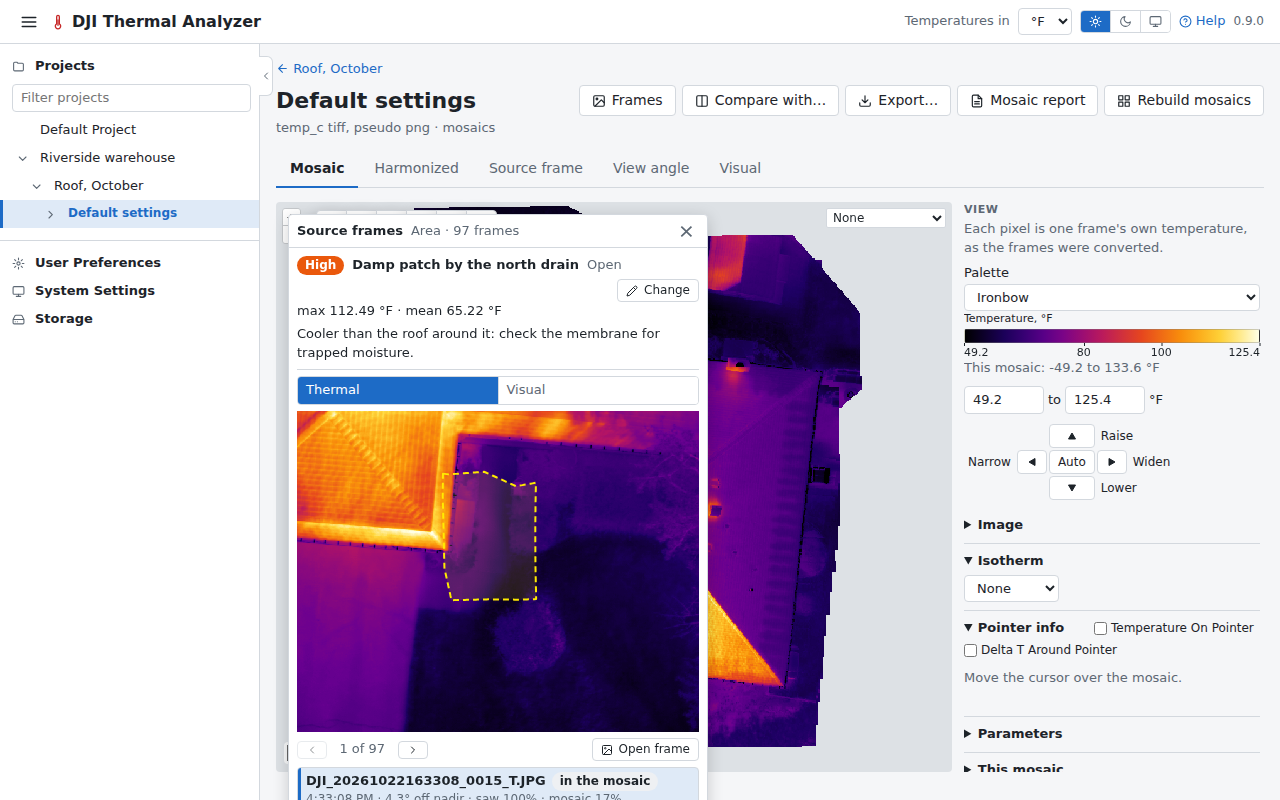
A finding is a spot, an area or a Delta T of a mosaic kept on its flight, with a name, notes, a severity and a status, the temperatures measured when it was kept, and the frames that saw it (all of them, or those you pick). On the visual mosaic of a flight of visual images only, an area's finding keeps its area and perimeter instead, and its frames are the visual photos. A finding on an imported dataset keeps the photos found from its WebODM task's cameras (the frames of a spot), or none without them.
Keeping one
- Draw a spot, an area or a Delta T on a mosaic and press Keep as finding on its card: the form opens with the frames beside it.
- Or keep one from the source frames window, or from a saved spot, area or Delta T measurement.
On the viewer
The viewer draws the findings on the map, outlined and tagged in their severity's colour. Click one, or its line in the side panel's Findings list, to open it with its frames and change it. They can all be hidden with one switch, or one by one, and a link keeps which are shown and which is open.
On the compare page
On the compare page each pane draws its flights' findings, opened with a click or a link and changed there. A spot, an area or a Delta T drawn in a pane is kept from its card's Source frames window, on the flight of the mosaic picked in the window (each mosaic the shape is read on has its own frames and Save as finding).
Elsewhere
A project's page lists its flights' findings together. The reports list them with thumbnails of their kept frames, numbered on their maps. A saved video frame can be attached to a finding.